YouTube Live Engagement: Tactics That Work

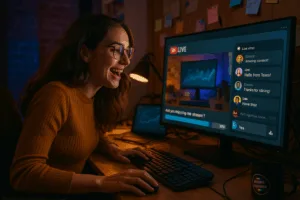
If you’ve ever run a YouTube Live broadcast, you know holding your audience’s attention takes more than hitting “Go Live.” With millions tuning in every day, competition is fierce. The winners are hosts who turn viewers into active participants. In this guide, we’ll break down practical methods and mindsets for YouTube Live engagement, so you’ll walk away knowing how to keep your audience hooked from the very first minute.
Unlocking the Potential of YouTube Live Engagement
Passing viewers are everywhere, but real YouTube Live engagement means turning passersby into regulars. Most creators need more than a talking head or product demo to stand out. Success comes from using every interactive tool available: live chats, audience polls, real-time Q&As—so your audience participates instead of just watching. Think of it as hosting a dinner party instead of performing on stage; people are more invested when they can vote, comment, or share opinions.
Just throwing out a poll or replying “cool!” in chat isn’t enough. YouTube pays close attention to session duration and repeat attendance. The more you interact, the more your content gets recommended. Savvy creators also cross-promote using YouTube Shorts and community posts, which help build anticipation and boost real-time participation. Learn more about leveraging AI workflow automation tools to streamline your live event promotions.
Best Practices for Real-Time Interaction
Certain tactics drive YouTube Live engagement more than others. According to AIR Insights, the frequency of interactive polls in livestreams doubled recently, leading to spikes in real-time chat activity and post-live engagement. Tossing out a poll early or weaving audience questions throughout your stream keeps viewers glued to the screen.
Planned Q&A sessions also work. Rather than just asking for questions at the end, set aside time blocks for Q&A so people stick around, waiting for their comment to appear on screen.
Many top creators schedule chat breaks every 10 or 15 minutes, calling viewers by name and reacting to messages. Even a simple shout-out—“Hey Louisa from Toronto, thanks for that idea!”—tells everyone that being active gets them noticed.
Using the YouTube Community tab to tease upcoming streams, share polls, or collect pre-stream questions builds anticipation. When you prime your audience days ahead, you’ll have more viewers ready to interact when you go live.
If you want to boost attendance further, integrate YouTube Shorts for teasers or behind-the-scenes previews. Creators using Shorts as livestream trailers are seeing much higher engagement. You can also plan and script engaging prompts in advance with our AI prompt builder tool.
Timing, Trends, and the Art of Scheduling
Random streams rarely outperform scheduled ones. Scheduled YouTube Live events—especially tied to trending topics or holidays—see much higher engagement. It’s not just about the time slot, but about giving your audience a reason to show up at a specific moment.
Use the YouTube Community tab and Shorts to advertise your livestream’s date and time a few days in advance. This allows viewers to set reminders and builds anticipation. If you’re running a themed event, such as a Mother’s Day cooking show, preview it in your Community tab, post a poll about favorite recipes, and share a teaser Short. Your audience will be more likely to show up and participate.
Building Loyalty: Responding to Comments Before and After
YouTube Live engagement isn’t limited to what happens during the stream. Gains also come from how you handle interactions before and after. Channels that respond to comments and highlight user-generated content build loyalty, which leads to repeat engagement.
For example, highlight top comments during your livestream or showcase viewer-submitted artwork and gameplay. Contributors feel special, and others see that active participation can earn recognition.
Consistency is crucial. Audiences notice if you always reply thoughtfully versus dropping generic “Thanks!” responses. Authentic interaction, both in chat and comments, forges relationships that keep your channel healthy through algorithm shifts.
High audience retention tells YouTube your stream is engaging. The more viewers you keep, the more your stream gets promoted, bringing in even more participants.
Insights from the Pros
Brian Dean of Backlinko sums it up: “YouTube’s live features make real-time interaction dynamic. Channels using chat moderation and polls outperform others in session duration and repeat attendance.”
You don’t need to reinvent the wheel. Focus on polls, chat shout-outs, and real-time moderation to surpass competitors. Many successful streamers appoint trusted viewers as chat moderators to keep things lively and positive.
Scheduling matters, too. Anna Petrenko from AIR Media-Tech points out that scheduled livestreams around trends or holidays enjoy significantly higher engagement. Treat your YouTube Live streams as events, not just content fillers.
FAQ: YouTube Live Engagement Questions
How can I make my YouTube Live streams more interactive?
Use live chat, polls, and Q&A segments throughout your stream. Respond in real time to questions and comments, and let viewers influence the direction with polls.
Does the timing of my livestream affect engagement?
Absolutely. Scheduling streams during trending events or peak audience times drives much higher real-time participation. Use YouTube’s reminder and scheduling features to your advantage.
Are community posts important for YouTube Live?
Yes. Interactive polls and stream reminders in the Community tab ramp up anticipation and early attendance.
What is the impact of audience retention?
High retention signals engagement to YouTube’s algorithm, making your stream more likely to be promoted and recommended.
Five Quick Wins for YouTube Live Engagement
- Make chat participation easy. Ask open-ended questions and acknowledge as many viewers as you can.
- Launch early polls. Use them within the first 10 minutes to pull viewers into the action.
- Use Shorts and community posts as teasers to boost attendance.
- Schedule streams for trending events or audience peak times, not at random.
- Follow up after the stream. Respond to comments, highlight user feedback, and keep the dialogue going.
The Human Side: Context and Audience Feel
Don’t lose sight of why your audience tunes in. Whether it’s for learning, entertainment, or community, the best YouTube Live engagement comes from using interactive features to amplify your own voice and style—not just chasing trends.
If engagement is low, start with chat, polls, scheduling, and follow-up before layering on new tactics. Usually, the basics make the biggest difference.
Wrap-Up
- Use interactive elements like polls, Q&A, and shout-outs. They are the backbone of strong YouTube Live engagement.
- Promote your livestreams with Shorts and community posts ahead of time to build excitement.
- Schedule streams for events or when your audience is most active.
- Respond to comments before, during, and after your stream to build loyalty.
- Treat YouTube Live like a conversation. When your audience feels seen, you stand out.